
All AI features in Power QMS for Teams – and how the value reaches your users
Eleven AI features built straight into the workflows: document generator, process wizard, summaries, version comparison, compliance check, gap analysis, reports, assistant, translation and import mapping – enabled individually, with no data leaving your own tenant.
AI that lands in your QMS – not next to it
Many QMS tools advertise AI today. Mostly that means a chatbot in a separate portal working on the vendor's data – not yours. Our approach in Power QMS for Teams is different: AI is built directly into the workflows, exactly where your people already work. No second tool, no second login, no data leaving your Microsoft 365 environment.
Four principles sit behind every AI feature:
- Built in, not bolted on: AI steps in where the work happens – in the document, in the process designer, in the read receipt, in the report.
- Drafts, not decisions: AI formulates proposals. Reviewing and approving stays with the named responsible people – every standard and every audit demands it.
- Your data as the basis: Answers and suggestions are generated from your documents and processes in your own SharePoint – with sources, never out of thin air.
- Enabled individually: Every AI feature can be switched on or off centrally or one by one. If you don't want AI, you simply won't notice a few buttons.
Overview: the eleven AI features
Sorted by functional area – from "creating documents" to "international and migration":
Creating documents and processes
- AI document generator – Upload an existing template, describe the content in free text: the AI creates a new document in your familiar structure as Word or PDF and files it straight into the selected process as a draft. A note becomes a structured draft in minutes – which then runs through the regular review and approval path.
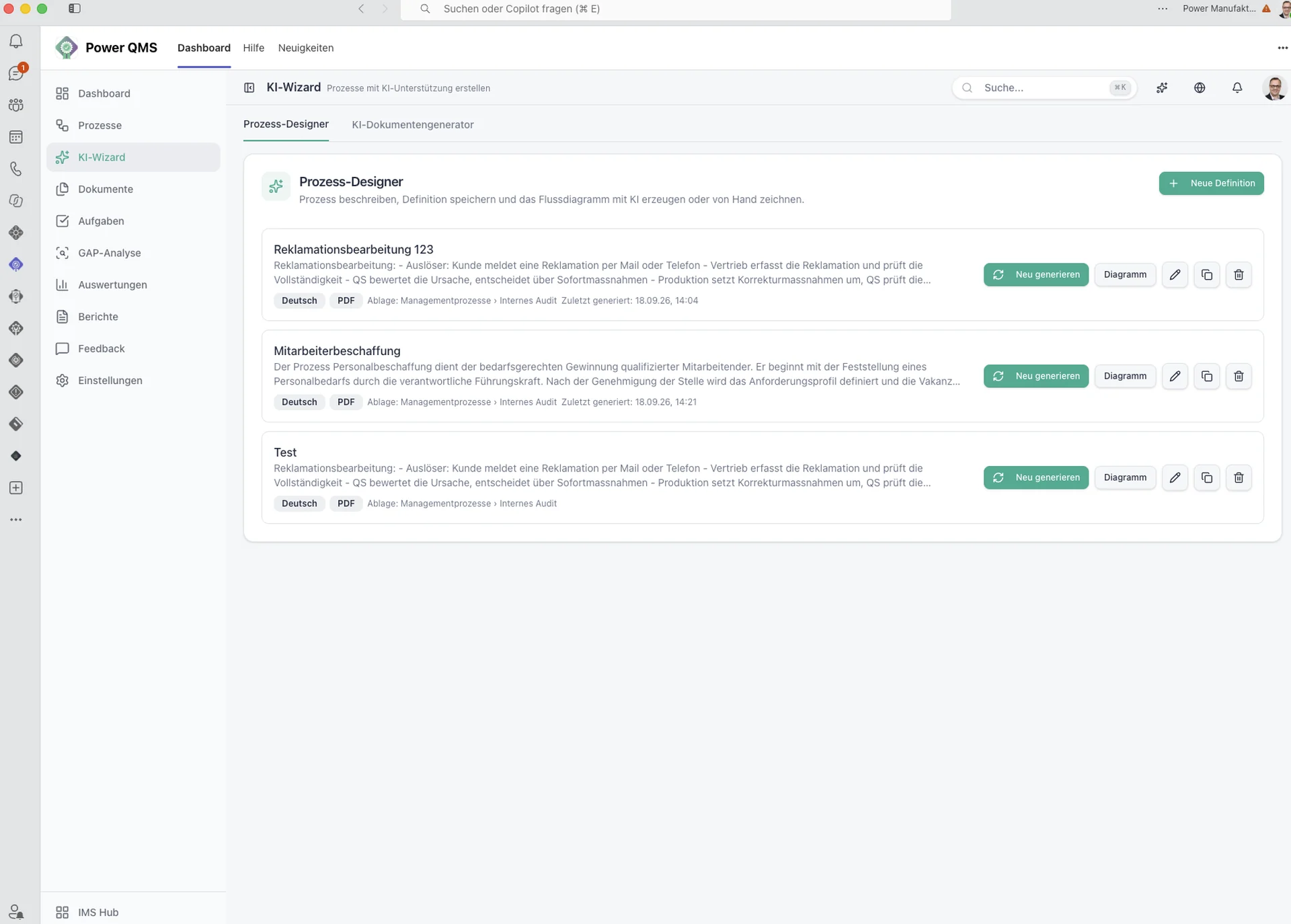
- AI process wizard – From a description, the wizard generates a BPMN flow model with lanes, tasks, decisions and subprocesses. The result lands in the visual process designer for further editing – and the designer works perfectly without AI too. Process modelling without BPMN training.
- Saved AI definitions – Definitions for recurring documents and processes can be saved and reused. Every generated document is created with the same structure and quality.
Understanding documents
- AI document summary – At the push of a button, the AI summarises a document into key points, responsibilities and review items – right in the document view, in the interface language (DE/EN/FR/IT). A 20-page procedure is grasped in 30 seconds.
- AI version comparison – Select two versions and the AI automatically summarises the content changes. The result serves as a review aid and can be reused. The approver instantly sees what really changed – without reading two PDFs side by side.
- "What's new?" in read receipts – Inside a read receipt, the AI can show a short summary with two to three bullet points on the changes in the new version. Employees confirm in seconds instead of reading the whole document – which noticeably lifts read rates.
Checking standards and compliance
- AI compliance check – Reviews a document draft like an ISO 9001 auditor: the AI reads the content, matches it against the existing document and process catalogue and returns an overall assessment, impacted documents and processes (with reasoning and confidence), improvement suggestions and gaps – such as missing responsibilities or review intervals. Every finding is rated high/medium/low and can be exported as a PDF. The second look before approval – before the auditor needs it.
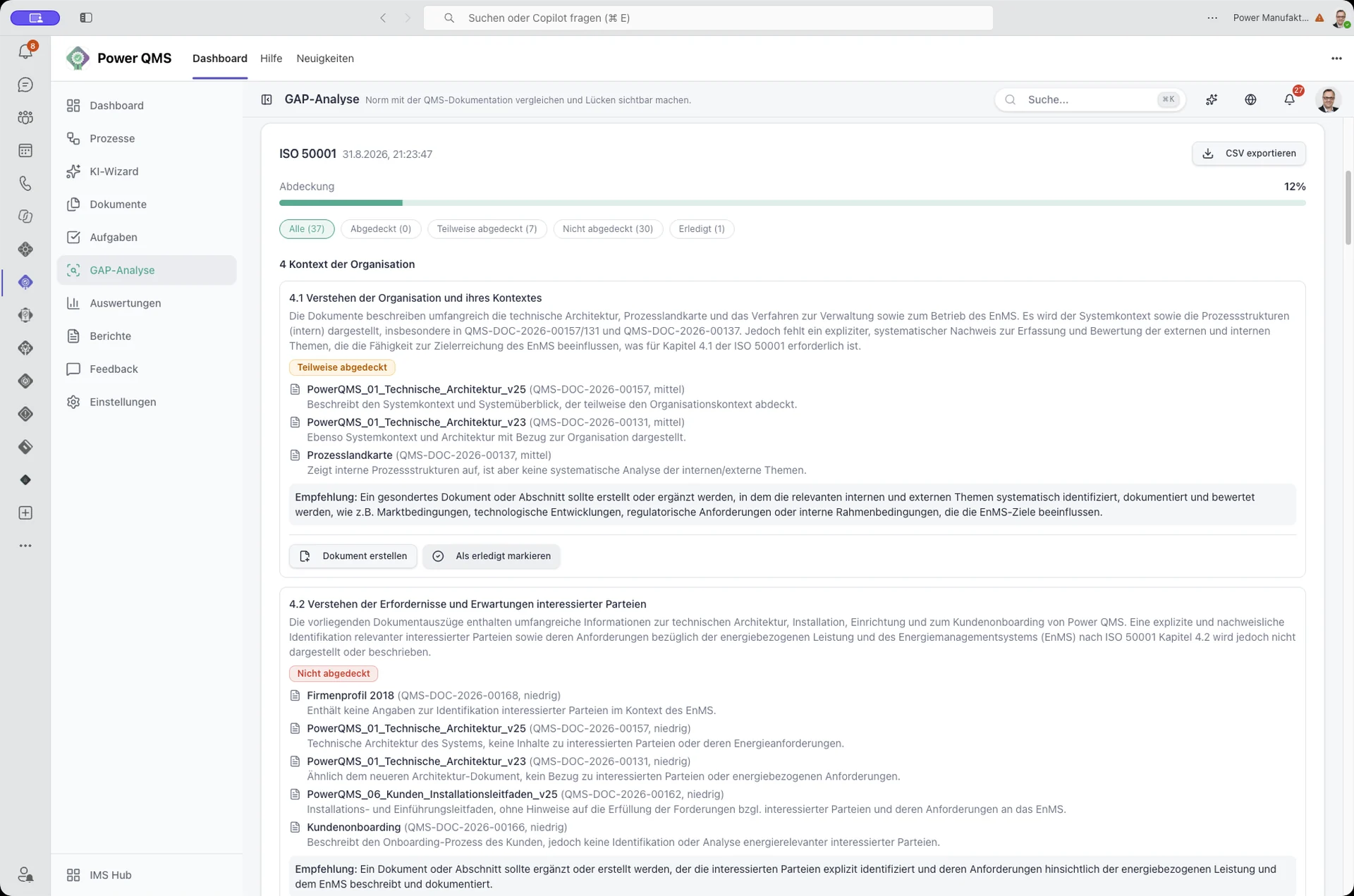
- AI gap analysis against standards – Upload a standard document, the AI extracts the clause structure (only the structure is stored, not the licensed standard text) and then matches your documents and processes clause by clause. The result is a coverage matrix with fulfilment level, supporting documents and open gaps – saved and repeatable. "Are we ready for certification?" becomes a documented answer.
Reports and questions
- AI report generator – Template-based QMS reports that the AI formulates as a management summary including recommended measures, ready to print or export. Management review takes hours instead of days.
- AI assistant – A chat assistant in the header that answers questions about documents, processes and tasks based on your own data – including sources and deep links to the content. "Which documents expire in the next 90 days?" gets not just an answer but a direct click to the evidence.
International and migration
- AI translation – Interface in German, English, French and Italian; process names and custom text blocks can be translated, optionally with AI translation suggestions. One master version, several languages – requirement 7.5.3 is met without parallel universes.
- AI mapping in the import wizard – When migrating document stocks, the AI suggests a target process and document type for uncertain rows – in the same review table, nothing is taken over unchecked. Even unstructured legacy stocks become routine work.
Control and data protection are part of the feature
AI in quality management is only accepted when control clearly sits with the company. That is why the control itself is a feature:
- AI control: All AI features can be enabled or disabled centrally or individually. A data protection notice must be confirmed before activation.
- Processing without storage: Server-side processing, with only the data of the respective call transmitted – no permanent storage and no training on your data.
- Transparent provider: The settings show which AI provider processes the data, in which region and under which contract – including a connection test and the option to switch AI off completely.
What does the AI cost?
The AI features are an optional add-on package for Power QMS and cost 10% of the module price per year (excl. VAT). Each feature can be enabled individually – you only activate what your teams actually use. Starting without AI loses none of the module's own functionality.
Conclusion
The value of AI is not created in a separate chat portal but in the flow of work: a draft ready in minutes. A summary that makes a long document graspable. A version comparison that shows the approver the changes. A gap analysis that documents certification questions. Power QMS for Teams brings these features exactly where your people work – individually enabled, controllable and without your data ever leaving your Microsoft 365 environment.
Want to see how this feels in your own QMS? Book a meeting with our QM and M365 specialists.

Keep reading
Ready for the next step?
Book a free 30-minute consultation – we discuss your requirements and show what is possible with Power IMS.