
Gap analysis for ISO 9001 and other standards – step by step to certification readiness
What a gap analysis is, when it pays off and how to compare standard requirements chapter by chapter with your documents – the classic way and AI-assisted in Power QMS for Teams.
What is a gap analysis?
A gap analysis compares the current state of your management system with what a standard requires. For each chapter – for example ISO 9001 clause 7.5 "Documented information" – the question is: have we addressed this, and can we prove it? The result is a list of gaps with concrete actions to close them.
Important: a gap analysis is not an audit. It is a self-assessment – honest, internal and done before you meet the certification body.
When is a gap analysis worthwhile?
- Before initial certification: where do we stand and how much work lies ahead?
- When adding a standard: you have ISO 9001 and want to add ISO 14001, 45001 or 27001.
- After a revision of the standard: which new or changed requirements affect us?
- After restructuring: new sites, mergers or a change of QM system.
- Before a surveillance audit: as a regular self-check so there are no surprises.
The classic approach in five steps
- List the requirements – turn the chapter structure of the standard into a checklist.
- Assign evidence – find the documents, processes and records that support each chapter.
- Assess – rate each chapter, for example "covered", "partially covered" or "not covered".
- Derive actions – for each gap, define what is missing: a document, a process, a form, a responsibility.
- Repeat – check again after implementation until coverage is right.
In practice this usually ends up in a spreadsheet. That works – until the file is outdated because documents have changed and nobody updates the references.
Common mistakes
- Assessing too coarsely: "Clause 8 fulfilled" says nothing. Assess at sub-clause level.
- Confusing evidence with intention: a planned procedure is not evidence. Count only what is published and valid.
- No actions: a list of gaps without owners and deadlines changes nothing.
- One-off exercise: the analysis is a snapshot. Without repetition it ages with every new document.
Gap analysis in Power QMS for Teams
In Power QMS for Teams the gap analysis is connected directly to your controlled documents. AI does the tedious mapping work – assessment and approval stay with you.
1. Add the standard
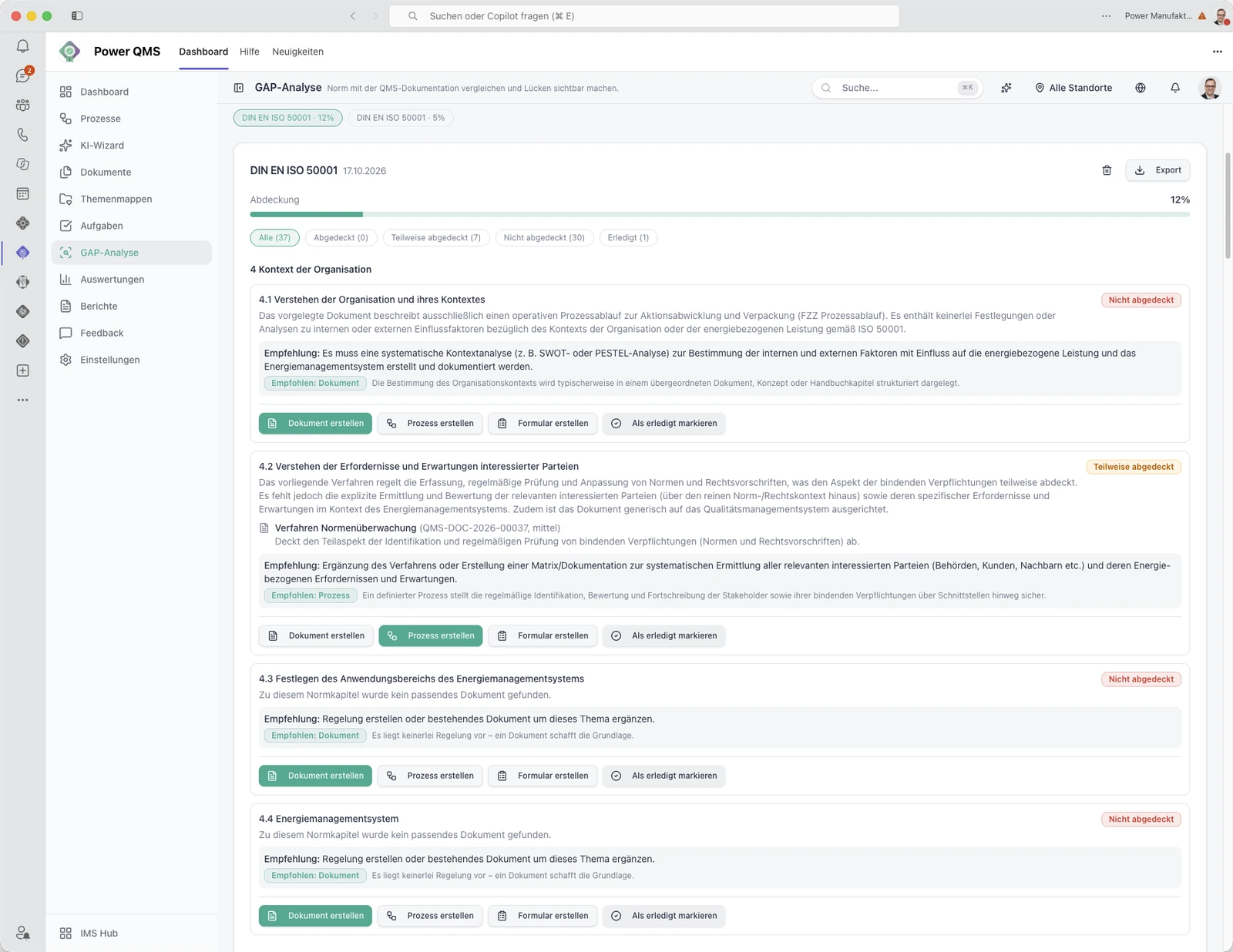
Under Gap analysis → Standards you upload your standard as PDF or Word and give it a name, for example "ISO 9001:2015". "Extract chapters" lets the AI draft the chapter structure, which you review and save. Only the chapter structure is stored, not the licensed text of the standard.
2. Start the analysis
Under Analyses you select the saved standard and the scope: all published documents by default, drafts optionally, and if needed restricted to specific processes. The AI first finds the most relevant documents for each chapter and then assesses their content against the requirement. Your own assessment guidelines are taken into account.
3. Review the result
For each chapter you get:
- Status: Covered, Partially covered or Not covered
- Rationale: why the AI assessed it that way
- Supporting documents with high, medium or low confidence
- Recommendation and suggested remedy: a missing document, process or form
From a suggested remedy you open a pre-filled dialog to create the missing document, process or form straight away.
4. Close gaps and repeat
You mark resolved chapters as done. In the next analysis they are carried over unchanged and only open chapters are reassessed. The one-off exercise becomes a repeatable self-check.
Standard evidence: coverage at a glance
In the analytics, the standard evidence view combines the results into a matrix: chapter by chapter with status, supporting documents and processes including version, status and validity. One click opens the document. The coverage rate is transparent: covered chapters plus half of the partially covered ones, divided by all chapters. The matrix can be filtered, searched and exported as PDF or Excel – useful for the management review and audit preparation.
Orientation catalogues with short chapter headings are included for ISO 9001, ISO 14001, ISO 45001, ISO/IEC 27001, ISO 50001 and ISO 13485. They do not replace the text of the standard or a complete requirements catalogue.
What the AI can do – and what it cannot
- The AI provides drafts and suggestions, not a certification statement. Your QM lead remains responsible.
- It assesses what is written in your documents. No AI can see undocumented practice – only the audit shows that.
- The gap analysis requires the optional AI add-on. It is built on Azure OpenAI, with selected models hosted in European data centres; your documents stay in your own SharePoint.
Conclusion
A good gap analysis answers "Are we ready for certification?" with evidence instead of gut feeling. Running it inside the QMS saves spreadsheet maintenance and lets you repeat it before every audit.
Read more about all AI features in All AI features in Power QMS for Teams. Want to see the gap analysis with your standard? Book a meeting.
Keep reading
Ready for the next step?
Book a free 30-minute consultation – we discuss your requirements and show what is possible with Power IMS.